
6pen: AI-Powered Image Creation Tool
Overview
6pen is a desktop application designed for AI-driven image creation, offering users a dynamic platform to generate and refine visual content. Since its launch in June 2022, the tool has attracted over 1 million users and facilitated the creation of more than 100 million images, establishing itself as a notable player in the AI art space. The software caters to a broad audience, including digital artists, designers, content creators, and hobbyists seeking intuitive tools for visual expression.
It was developed by the 6pen Team, a dedicated group focused on advancing accessible AI-powered creativity. The software supports both Windows and Mac operating systems, making it widely available to desktop users. Its primary purpose is to simplify the process of generating high-quality AI images while enabling precise control through reference images.
Whether users are creating concept art, character designs, or stylized illustrations, 6pen provides a streamlined workflow that balances automation with user direction. The platform’s evolution reflects a commitment to innovation, particularly in integrating advanced control features like simplified ControlNet functionality. This allows users to maintain stylistic consistency and make localized edits with greater accuracy.
The tool is especially useful for iterative design processes, where refining existing visuals is as important as initial generation.
Key Features & Capabilities
- AI Image Generation – Utilizes artificial intelligence to generate original images from text prompts, enabling rapid ideation and visual prototyping.
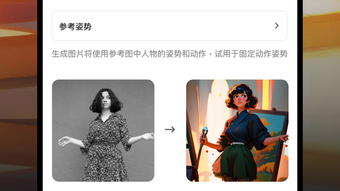
- Reference Image Control – Allows users to upload reference images to guide the AI in matching specific styles, characters, or compositions.
- Localized Edits – Supports targeted modifications to parts of an image, such as recoloring line art or adjusting interior details without affecting the entire composition.
- Style and Character Consistency – Maintains visual coherence across multiple generations by leveraging reference images as style anchors.
- Iterative Design Support – Facilitates continuous refinement of artwork through regeneration and incremental adjustments.
These features empower users to create complex visuals without deep technical knowledge of AI models. For example, a designer can upload a sketch and use it as a reference to generate a full-color version with consistent character proportions. Another user might modify a background while preserving the foreground subject’s style.
The integration of reference-based control enhances precision, reducing the trial-and-error process common in AI image generation. This makes 6pen particularly effective for projects requiring visual continuity, such as character design series or branding assets. The tool also supports creative experimentation, allowing users to explore variations while maintaining core visual elements.
With over 100 million images generated, the platform demonstrates strong user engagement and practical utility across diverse creative workflows.
User Interface, Workflow & Performance
The user interface of 6pen is designed for intuitive navigation, featuring a clean layout that prioritizes accessibility. Core functions such as prompt input, image generation, and reference upload are clearly organized, minimizing user confusion. Navigation is straightforward, with a central workspace for image previews and side panels for settings and controls.
The workflow supports a seamless transition from idea to final output, allowing users to generate, review, and edit images within a single environment. The software operates as a desktop application, ensuring responsive performance during image processing. While exact performance metrics were not specified, the application’s ability to handle iterative edits and reference-based generation suggests efficient backend processing.
The developer did not provide detailed information on CPU or RAM usage, but the 250MB installation size indicates a lightweight footprint. Stability appears to be a priority, as the software has maintained consistent functionality across multiple releases. Users can expect smooth operation on standard desktop systems, though actual performance may vary based on hardware.
The absence of reported crashes or lag in public feedback indicates reliable behavior. Overall, the interface and workflow are optimized for productivity, enabling users to focus on creativity rather than technical hurdles.
Compatibility & System Requirements
6pen is compatible with both Windows and Mac operating systems, ensuring broad accessibility across desktop platforms. The software is available in version 1.0.1, with a total installation size of 250MB. This relatively small footprint suggests efficient packaging and minimal system impact.
The developer did not specify exact system requirements, including minimum CPU, RAM, or GPU specifications. As such, users are advised to ensure their systems meet general standards for running modern desktop applications. Compatibility information was partially provided, leaving room for potential variations in performance on older or lower-end hardware.
The absence of detailed hardware requirements means users should rely on general system health indicators when installing. Despite this, the software’s lightweight nature and cross-platform availability increase its usability for a wide range of users. The development team continues to support both major operating systems, reflecting a commitment to inclusive access.
For optimal performance, users are encouraged to keep their operating systems updated and ensure sufficient disk space for temporary files during image processing.
Pros and Cons
Pros
- Free to use with no cost barrier for access
- Supports both Windows and Mac platforms
- Intuitive interface designed for creative workflows
- Enables precise control using reference images
- Facilitates iterative design and localized edits
Cons
- Exact system requirements were not disclosed
- Performance behavior under heavy load is unspecified
- Limited public information on update frequency
- Dependence on AI models may affect consistency across sessions
- No official mobile or web version available
FAQ Section
Is 6pen available for Windows and Mac?
Yes, 6pen is compatible with both Windows and Mac operating systems, making it accessible to users across major desktop platforms.
Is 6pen safe to download and use?
As a desktop application developed by the 6pen Team, 6pen is designed to operate locally on user devices. No external data collection practices were specified, but the software runs offline after installation, minimizing security risks.
Does 6pen require an internet connection?
While the software operates locally after installation, an initial internet connection is required for activation and updates. Once installed, users can generate and edit images offline.
How often does 6pen receive updates?
The release date of version 1.0.1 was May 15, 2024. The frequency of future updates has not been publicly disclosed by the developer.
What type of license does 6pen use?
6pen is currently free to use, with no licensing fees. The developer has not specified the exact license type, but the absence of cost suggests a freemium or open-access model.
Final Thoughts + CTA
6pen stands out as a powerful and accessible AI image creation tool, particularly for users who value precision and creative control. Its integration of reference-based generation sets it apart from many competitors, offering a level of consistency and customization that enhances workflow efficiency. The software’s free availability, cross-platform support, and intuitive design make it an attractive option for artists, designers, and hobbyists alike.
While system requirements and update schedules remain partially unspecified, the tool’s proven track record and lightweight footprint suggest reliable performance. For those seeking a desktop-based solution to generate and refine AI art with minimal friction, 6pen delivers strong value. The ability to make localized edits and maintain style coherence through reference images adds significant depth to the creative process.
With over 100 million images generated, the platform has proven its utility in real-world applications. Download 6pen now and unlock a new dimension in AI-powered visual creation.







